
Rachel Rofe – Quick Audience
Overview of Rachel Rofe – Quick Audience, a 6-week Whatnot selling program covering niche selection, the Source, Show, Ship system, and consignment sourcing.
$9.99
Explore Will Ray – Whole Machine, an agency operations kit covering plain-PHP contractor sites, AI build chains, local SEO routines, SOPs, and hiring.
Will Ray – Whole Machine is packaged as a complete operational kit for running a small web agency focused on US local contractors. Rather than covering only how to land a first web design project, the advertised 175-file collection centers on what happens after the sale: building client demos quickly, handling leads reliably, managing ongoing local SEO, reporting results, and preparing to hire help. Its most distinctive trait is an explicit boundary between automated workflows, AI-assisted drafts that wait for human review, and tasks that remain intentionally manual.
The vendor structures the material across six operational stages: getting clients, building the site, getting them found, keeping the client, running the shop, and hiring help. At the center of the documentation are 21 standard operating procedures, each labeled according to whether it runs on its own or requires operator action. Beginners who have never been paid for a website are directed first to YOUR-FIRST-CLIENT.md, which sequences the rest of the files toward securing an initial client commitment, alongside six ordered documents covering cold outreach through payment and a day-by-day plan for the first month.
In addition to the post-sale agency files, the package bundles five previously separate digital downloads: Build First (included as a lightly edited file named THE-BOOK.html), the Demo Site Loop, the Outreach Swipe File, the Filled-In Vault, and the 30 Day Workbook. Buyers who already own Build First should note that the book portion overlaps directly, meaning the primary addition here is the surrounding delivery and agency infrastructure.
On the technical side, the system avoids JavaScript frameworks and build pipelines in favor of a runnable plain-PHP contractor site skeleton. Pages, reviews, projects, and awards are data-driven, meaning a new entry in the underlying data generates the corresponding section. To prevent lost inquiries if an email server fails, the included lead form writes submissions to leads.jsonl on disk before attempting to send an email. For managing multiple clients, the package also includes a build session for a plain-PHP lead hub that you assemble yourself, plus two additional build sessions covering a weekly autopilot and a monthly report assembler.
Several SEO and conversion mechanics are built directly into the advertised templates and workflows:
To keep AI tools consistent across these steps, the package pairs a four-prompt demo build chain with context assets: a business profile, a gap audit, and the Filled-In Vault notes system with guided setup sessions.
A useful check for prospective buyers is how the vendor categorizes automation across the shop. According to the outline, data-driven skeleton pages, disk-backed lead logging, and current dashboards run on their own. Prospect research, the four-prompt demo build, pre-launch QA, keyword maps, and monthly client reports are generated quickly by AI and then wait for human approval before reaching a client. Outreach, discovery, pricing, closing, live URL verification, writing blog posts, and the 45-minute weekly review remain manual by design.
The listing also notes five built features that are not switched on because they depend on third-party approvals: carrier registration for automated textback, platform review for a comment-to-DM autoresponder, and API access for business-profile metrics. Each is advertised with a written explanation of the blocker and a manual fallback you can run immediately, though none of the underlying code or webhook rules have been independently tested here.
For local setup on your own computer, the vendor states that you need PHP installed locally, enough HTML and CSS familiarity to copy and edit blocks, an evening for setup and reading, and an AI tool capable of reading and writing local files—specifically citing Claude Code, Cursor, or Claude Desktop. No React, build tools, hosting, or CRM subscription are required just to run the skeleton locally.
Moving from local setup to live client operations introduces different requirements. Live sites require flat PHP hosting, and the vendor notes that an included stack file documents every tool used in operation, including two paid tools without specifying whether either is optional. Because the available listing consists of sales notes and an outline without a detailed lesson-by-lesson syllabus or independently inspected files, readers should verify how the build sessions are formatted and ensure they are comfortable handling sales and pricing conversations themselves before choosing this kit over a smaller starting step like Build First.
No reviews yet.
The vendor states that initial setup runs locally on your own machine using PHP, basic HTML and CSS editing, and a file-editing AI assistant such as Claude Code, Cursor, or Claude Desktop, with no hosting, React, or CRM subscription required to start. For live operations, you need flat PHP hosting, and the included stack file names every tool used, including two paid tools without specifying whether either is optional.
Yes. According to the vendor, THE-BOOK.html inside the package is a lightly edited version of Build First, and all five of the creator's standalone downloads are bundled. Buyers who already own Build First are purchasing this package for the post-sale operation, PHP site skeleton, SOPs, SEO workflows, and hiring kit rather than new book content.
The vendor divides the 21 SOPs and technical pieces into four groups: elements that run on their own (such as data-driven skeleton pages, disk-backed lead logging, and dashboards), tasks AI executes for human review (prospect research, demo builds, pre-launch QA, keyword maps, and monthly reports), tasks kept manual on purpose (outreach, discovery, pricing, closing, live deployment checks, blog writing, and weekly reviews), and five built features currently paused behind external approvals with manual fallbacks provided.
The vendor notes that while the outreach and delivery workflow applies elsewhere, all examples and pricing structures are built around US local contractors, so local rates must be adjusted. For beginners who have never sent an outreach message to a business, the vendor recommends starting with the First Client Playbook or Build First first.
Overview of Rachel Rofe – Quick Audience, a 6-week Whatnot selling program covering niche selection, the Source, Show, Ship system, and consignment sourcing.
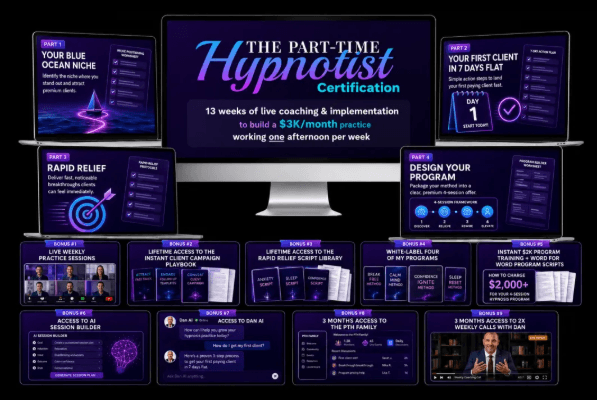
Overview of Dan Candell – Part Time Hypnotist 4.0, covering the Rapid Relief Method, 4-Session Transformation Framework, scripts, and client playbooks.
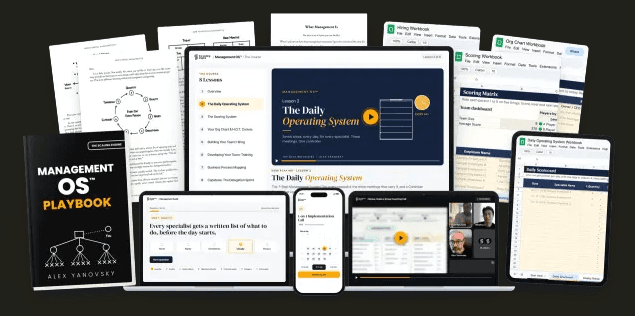
Alex & Elan Yanovsky – Management OS covers an 8-lesson restaurant management blueprint, Google Sheets workbooks, hiring pipelines, and process mapping.